
6. Simulation using Gnucap
6.1. Introduction to Gnucap
Gnucap circuit simulator is an open-source modern circuit simulator with support for VerilogAMS. It is hosted at several mirrors but the most up to dater is the one on codeberg. The documentation is fragmented and the adoption in open source EDA tools is limited. However, gnucap is a powerful tool especially for mixed signal simulation.
6.2. Gnucap and gnucap-modelgen-verilog installation on ubuntu 22.04 LTS
Due to gnucap’s modular architecture the installation process consists of two basics steps:
installation of gnucap - main application
installation of gnucap-modelgen-verilog - Verilog-AMS model generator/compiler
The gnucap installation is straightforward. The source code can be obtained from this repository. In order to install gnucap the following commands should be executed:
cd
git clone https://codeberg.org/gnucap/gnucap.git gnucap
cd gnucap
./configure
make
sudo make install
The same method applies to the gnucap-modelgen-verilog tool, which can be obtained from this website. It is used to compile Verilog-AMS models to be included in gnucap simulation engine.
cd
git clone https://codeberg.org/gnucap/gnucap-modelgen-verilog.git gnucap-modelgen-verilog
cd gnucap-modelgen-verilog
./configure
make
sudo make install
6.3. Gnucap basic example
There are not many basic/medium level examples in the public space on how to simulate circuits with gnucap. Nevertheless both repositories contain not only sources but also an extensive test suites, where many examples can be found.
This document presents a basic examples of usage of gnucap using IHP SG13G2 PDK devices.
Note
Gnucap is interactive and has a unique feature, where you can switch between netlist formats at runtime. Currently it supports Spice, Verilog-AMS and spectre formats.
// Verilog
verilog
load mgsim
load vams/vpulse.so
load ../../plugins/psp103_nqs.so
load ../../plugins/cornerMOSlv_tt.so
options log

// Circuit
// verilog style
ground gnd;
sg13_lv_nmos #(.w(1.0e-6), .l(0.13e-6), .ng(1)) XM1(nd, ng, gnd, gnd);

// spice style
spice
Vgs ng gnd 0.4
Vds nd gnd 1.2

// simulation setup spice-like
.print dc ids(XM1.M1) v(nodes)
.dc Vds 0 1.2 0.01 Vgs 0.0 0.8 0.05 > gnucap.txt
Gnucap uses C/C++ style comments (//) for verilog mode and spice style comments (// and *) for spice mode.
The verilog keyword switches gnucap to verilog-ams mode, while the spice keyword switches gnucap to spice mode.
The load command is used to load the required plugins for the simulation. In particular the `vams/vpulse.so` plugin is
required for pulse sources and it was generated form a Verilog-AMS description using the gnucap-modelgen-verilog tool.
The psp103_nqs.so and cornerMOSlv_tt.so plugins are required for IHP SG13G2 PDK devices and are generated using the PDK libraries and
gnucap-modelgen-verilog tool as well. The options log command enables logging of the simulation progress.
The next section of the circuit describes the circuit itself. In this case a single NMOS transistor is instantiated using Verilog-AMS style.
The ground command introduces the ground node. The transistor is instantiated using the sg13_lv_nmos module with parameters for width,
length and number of gates. The transistor terminals are connected to nodes nd (drain), ng (gate) and gnd (source and bulk).
The next section of the netlist describes the voltage sources using spice style. Two voltage sources are defined: Vgs for gate-source voltage
and Vds for drain-source voltage. The simulation setup section defines the output to be printed and the nested DC sweep analysis redirected
to a file named gnucap.txt. The file contains columns of data for the drain current and node voltages for each combination of Vds and Vgs values.
#          ids(XM1.M1) v(gnd)     v(nd)      v(ng)
0.         0.         0.         0.         0.
0.01       1.74E-12   0.         0.01       0.
0.02       3.003E-12  0.         0.02       0.
0.03       3.921E-12  0.         0.03       0.
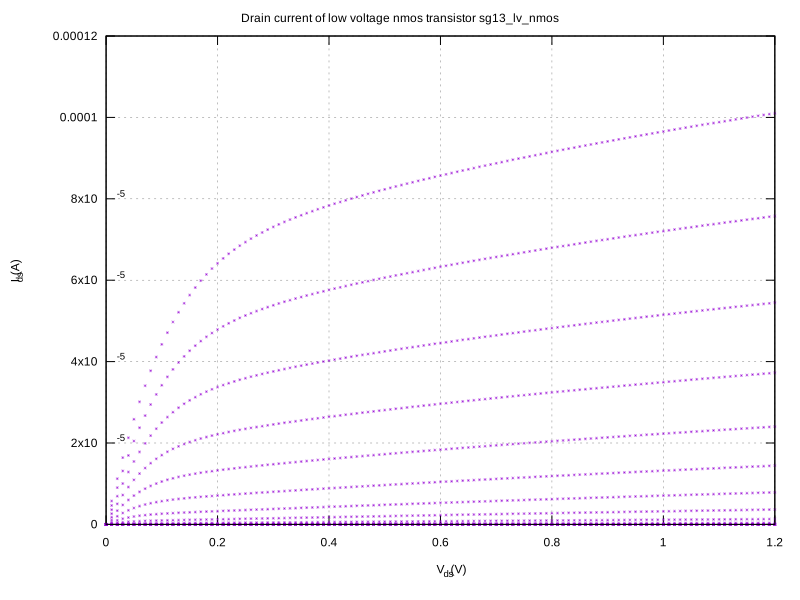
One of the easiest way to plot the data is to use either python matplotlib or gnuplot. The following example shows a gnuplot script, which plots the drain current vs Vds for different Vgs values.
# For PDF output
#set terminal pdfcairo size 800,600
#set output "sg13_lv_nmos.pdf"
# For SVG output
set terminal svg size 800,600
set output "sg13_lv_nmos.svg"

set multiplot layout 1,1 title "Drain current of low voltage nmos transistor sg13\\_lv\\_nmos"

set grid
set ylabel "I_{ds} (A)"
set xlabel "V_{ds} (V)"
unset key
plot "gnucap.txt"  using 1:2 with points pt 3 ps 0.3

unset multiplot
set output
The SVG output of the plot is shown below:
6.4. Compiling a Verilog-A model to be used in a simulation
The gnucap-modelgen-verilog tool is used to compile Verilog-A models to be used in gnucap simulations. This step can be executed using the following one-liner command:
gnucap-mg-vams --cc model.vams | g++ -xc++ `gnucap-conf --cppflags` -fPIC -shared - -o model.so
In this example the Verilog-AMS model is contained in the model.vams file and the output shared object file is model.so and can
be loaded in gnucap using the load command as shown in the previous example.
The following code shows a basic Verilog-A models of a 2 input NAND gate and a D-type flip-flop.
`include "disciplines.vams"

module anand (out, in1, in2);

input in1, in2;
output out;
electrical out;
electrical in1, in2;
parameter real vh = 1.2;                    // output electrical in high state
parameter real vl = 0;                      // output electrical in low state
parameter real vth = (vh + vl)/2;   // threshold electrical at inputs
parameter real td = 0 from [0:inf); // delay to start of output transition
parameter real tt = 0 from [0:inf); // transition time of output signals

analog begin
    @(cross(V(in1) - vth) or cross(V(in2) - vth));

    V(out) <+ transition( !((V(in1) > vth) && (V(in2) > vth)) ? vh : vl, td, tt );
end
endmodule

module dff1 (q, qb, clk, d);

output q;
electrical q;       // Q output
output qb;
electrical qb;      // Q bar output
input clk;
electrical clk;     // Clock input (edge triggered)
input d;
electrical d;       // D input
parameter real td = 0 from [0:inf); // delay from clock to q
parameter real tt = 0 from [0:inf); // transition time of output signals
parameter real vh = 1.2;                    // output voltage in high state
parameter real vl = 0;                      // output voltage in low state
parameter real vth = (vh + vl)/2;   // threshold voltage at inputs
parameter integer dir = +1 from [-1:+1] exclude 0;
            // if dir=+1, rising clock edge triggers flip flop
            // if dir=-1, falling clock edge triggers flip flop
real state;

analog begin
    @(cross(V(clk) - vth, dir))
    state = (V(d) > vth);

    V(q) <+ transition( state ? vh : vl, td, tt );
    V(qb) <+ transition( state ? vl : vh, td, tt );
end
endmodule
After compilation the model was included in the following framework of the simulation:
load mgsim
load ./gates.so
load vams/vpulse.so
load ../../plugins/psp103_nqs.so
load ../../plugins/cornerMOSlv_tt.so
load ../../plugins/capacitor.so
// options log
verilog
ground gnd;
anand xnand(nand, i1, i2);
dff1 xdff(q, qb ,clk, nand);

sg13_lv_nmos #(.w(1.0e-6), .l(0.13e-6), .ng(1)) XM1(xout, nand, vss, vss);
sg13_lv_pmos #(.w(1.0e-6), .l(0.13e-6), .ng(1)) XM2(xout, nand, vdd, vdd);
sp_capacitor #(.capacitance(1e-14)) C1(xout, gnd);
sp_capacitor #(.capacitance(1e-14)) C2(q, gnd);
sp_capacitor #(.capacitance(1e-14)) C3(qb, gnd);

spice
Vdd1 vdd gnd 1.2
Vss1 vss gnd 0.0
V1 i1 gnd pulse(0, 1.2, 0, 1n, 1n, 5u, 10u)
V2 i2 gnd pulse(0, 1.2, 0, 1n, 1n, 3u, 10u)
Vclk clk gnd pulse(0, 1.2, 200n, 1n, 1n, 500n, 1u)

.print tran   v(i1) v(i2) v(nand) v(xout) v(clk) v(q)
.tran  10u  > tran.txt trace off quiet
.status
Gnucap will redirect the transient simulation output into tran.txt file.
The additional measurements are stored added to a file file, which
stores the voltages at specific time instants.
Warning
In order to make the measurements work properly the store tran v(*) command is required to store all node voltages.
The associated gnuplot script to plot the transient response is shown below:
# For PDF output
#set terminal pdfcairo size 800,600
#set output "gates.pdf"
# For SVG output
set terminal svg size 800,600
set output "gates.svg"
set multiplot layout 6,1 title "AMS circuit transient results"
set grid
set yrange [-0.1:1.3]
set style line 1 lc rgb "blue"  lw 2
set style line 2 lc rgb "red"   lw 2
set style line 3 lc rgb "black" lw 2

set ylabel "V(i1) (V)"
plot "tran.txt" using 1:2 with lines ls 1 title "V(i1)"

set ylabel "V(i2) (V)"
plot "tran.txt" using 1:3 with lines ls 1 title "V(i2)"

set ylabel "V(nand) (V)"
plot "tran.txt" using 1:4 with lines ls 2 title "NAND output V(nand)"

set ylabel "V(xout) (V)"
plot "tran.txt" using 1:5 with lines ls 2 title "Inverted NAND V(xout)"

set ylabel "V(clk) (V)"
plot "tran.txt" using 1:6 with lines ls 3 title "Clock signal V(clk)"

set ylabel "V(q) (V)"
plot "tran.txt" using 1:7 with lines ls 3 title "Flip-Flop output V(q)"

unset multiplot

set output
The SVG output of the plot is shown below:
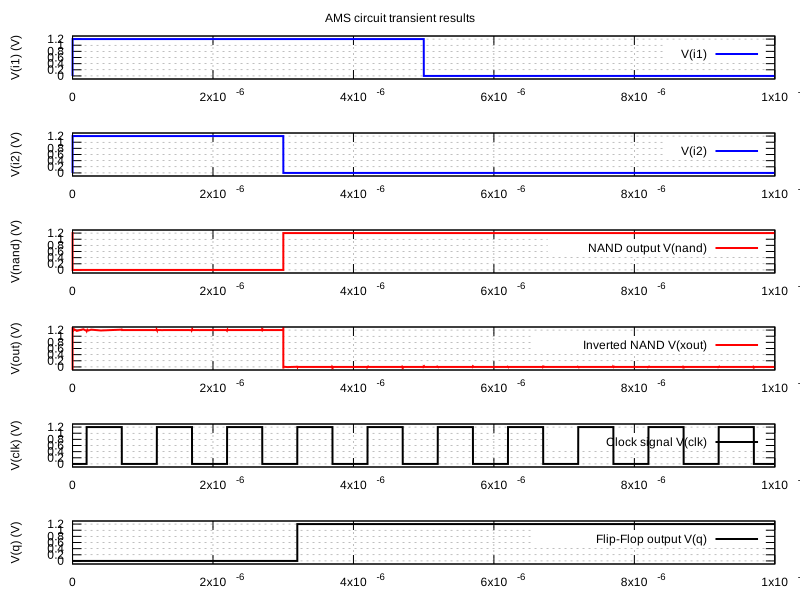
As shown on the plot the NAND gate output follows the expected truth table and the flip-flop captures the NAND gate output at the rising edge of the clock signal. Additionally the inverted made out of primitive low voltage complementary devices inverts the input signal correctly. The inverter output contains some artefacts characteristic for analog simulation, which are not present at other nodes due to the applied model.
Note
Conclusions
The presented circuit mixes different levels of Verilog-A modelling styles. The NAND gate is modelled using
behavioral approach neglecting underlying device level of hierarchy as well as the flip-flop.
In the testbench the testand module was defined instantiating the NAND gate, the flip-flop and associated voltage
sources for generating stimuli.
The transient analysis was defined using the tran command and the results were stored in a file named tran.txt.
This approach is suitable for fast digital simulations, where the focus is on the logic functionality.
6.5. References
You can find some more resources here:
Official documentation Gnucap
Source code + test suites CodebergSite
FOSDEM 2018 Gnucap talk Fosdem2018
FOSDEM 2017 Gnucap talk Fosdem2017
IGER 2023 Gnucap talk IGER2023
An overview of algorithms in Gnucap IEEE2023
The gnucap model compiler IEEE2022