
1. General
1.1. Purpose
This document describes layout devices for IHPs SG13G2 SiGe BiCMOS technology.
1.2. Abbreviations
Please refer to the List of abbreviations in the layout rules section for further details.
1.3. Derived Layers
Note
Various device definitions require derived layers instead of the original layers. The generation rules for the derived layers are described below.
Layer name |
Definition |
|---|---|
PWell |
NOT (NWell OR PWell:block) OR PWell:drawing |
nSD |
NOT (pSD OR nSD:block) OR nSD:drawing |
NWell_tie |
(Activ AND nSD) inside NWell |
NWell_holes |
(HOLES NWell_tie) Not NWell |
substrate_tie (ptap) |
(Activ AND pSD) inside PWell |
ptap_holes |
HOLES substrate_tie |
ntap |
(Activ AND nSD) inside NWell |
ntap_holes |
HOLES ntap |
ContBar |
Any Cont shape not being a square shape is considered a ContBar. |
The following figure illustrates the NWell_holes/Ptap_holes layers mentioned in the preceding table.
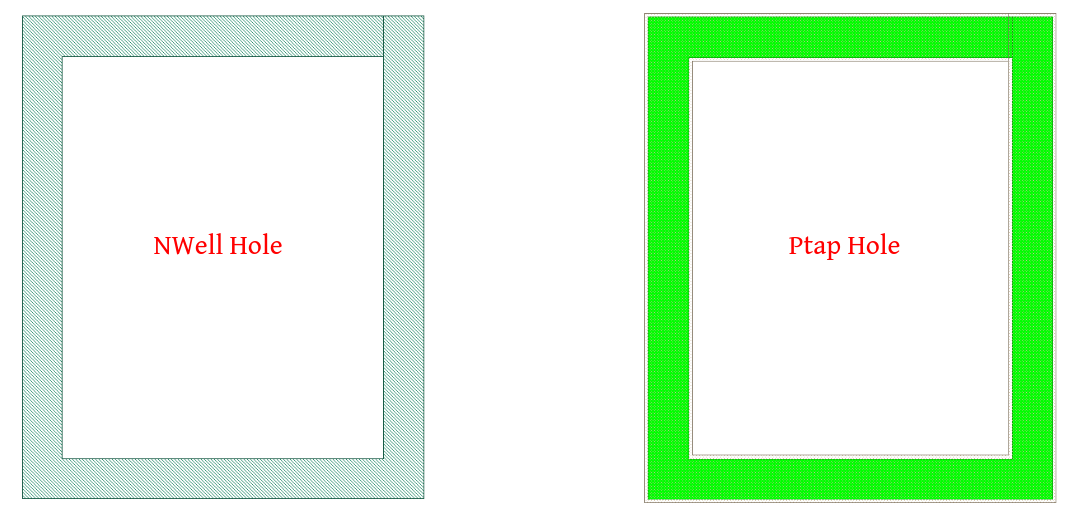
Figure 1.3.1 Nwell-Holes derived layer
Tip
Refer to the layout layers section for information about drawing layer colors.
1.4. Glossary of Terms
The following table provides definitions for terms that will be used in the upcoming sections:
Term |
Definition |
|---|---|
Description |
Brief explanation or summary of the device or parameter. |
Device Recognition |
Refers to the essential layers used to identify the device within a design. |
Model Name |
The specific name assigned to the device, which is recognized and used within the netlist. |
Layout Cell Name |
The name given to the layout cell representing the device in the sg13g2_pr gds layout file. |
Parameters |
A list of all configurable parameters that can be applied to the device. |
Netlist Syntax |
The specific syntax or format used to represent the device within a netlist, typically including the device name and its associated parameters. |
Additional Notes |
Any additional information or special considerations relevant to the device. |
Schematic-View |
Indicates whether the parameter is available in the schematic view. |
LVS-View |
Indicates whether the parameter is available in a Layout versus Schematic (LVS) view. |
LVS-Comparison |
Indicates whether the parameter is included in the comparison process during Layout versus Schematic (LVS) checking. |