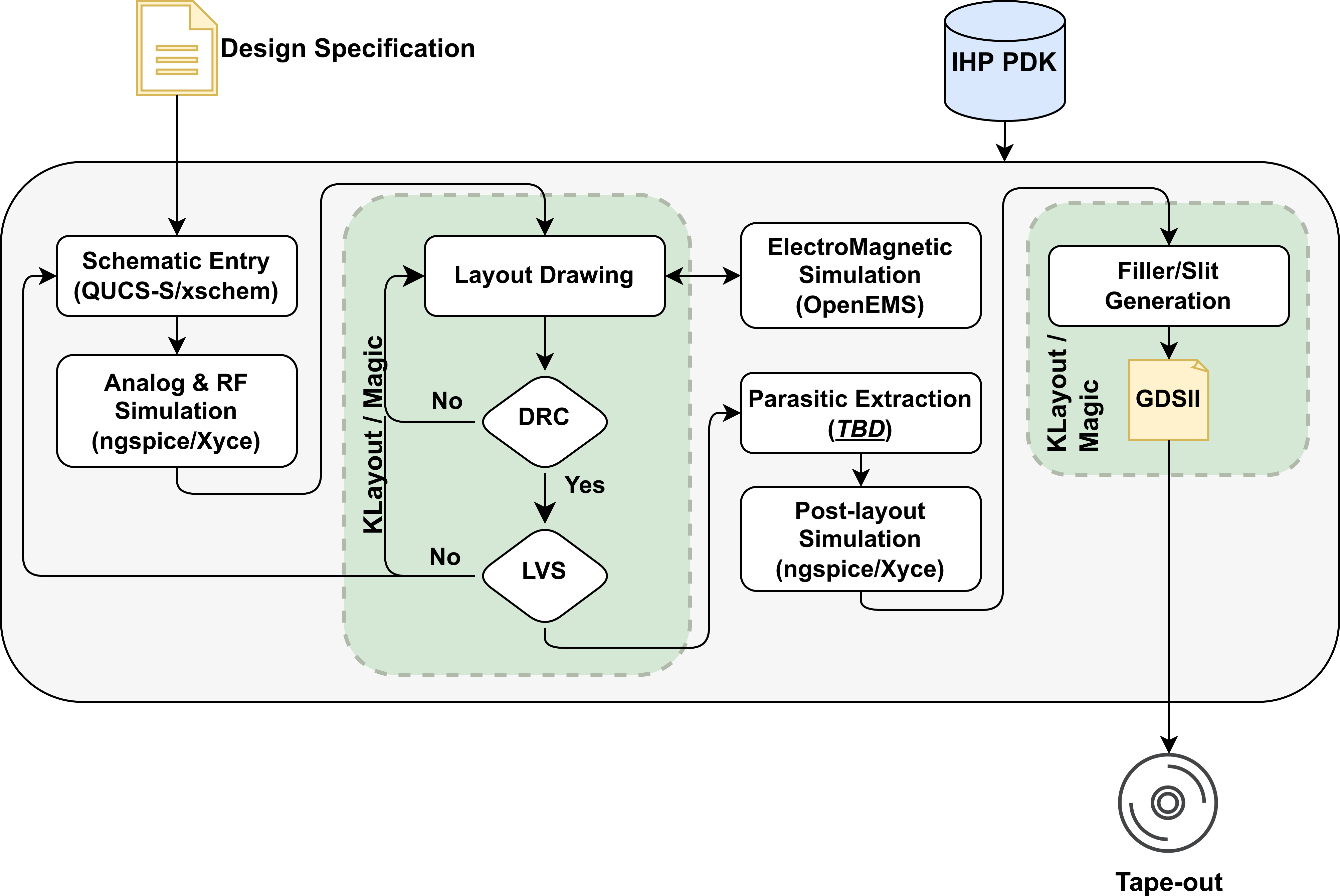
3. Design using Qucs-S
Qucs-S (Quite Universal Circuit Simulator - SPICE) is a fork of the Qucs project that integrates SPICE simulation capabilities. Unlike the original Qucs, which uses its own solver, Qucs-S allows users to simulate circuits using a variety of SPICE engines like Ngspice, XYCE, or any other SPICE-compatible simulator. This makes it versatile for both analog and digital circuit simulation. Qucs-S maintains the same graphical user interface (GUI) as Qucs, enabling schematic capture, simulation, and waveform viewing in a user-friendly environment, but with the added flexibility of SPICE simulation. Qucs-S has also a “look & feel” like a proprietary Keysight ADS tool.
Since 2025 we use a dedicated branch, hosted on qucs repository to integrate and maintain Qucs-S with IHP PDKs. This branch introduces support for devices and schematic objects defined using XML schema. It supports geometrical primitives and allows to use different parameters and netlisting options. More details about Qucs-S XML devices can be found here.
3.1. Adding a new library and objects to Qucs-S via XML interface
At the moment all the symbols and devices shall be placed in a
$PDK_ROOT/$PDK/libs.tech/qucs/symbols directory. The supported geometry primitives, which
can be used to create symbols are the following:
<Line x1="-6" y1="9" x2="6" y2="0" color="#000080" width="2" style="1" />
<Line x1="-10" y1="5" x2="0" y2="5" color="#000080" width="2" style="1" condition="type=nmos" />
<Arc x="20" y="-10" arcWidth="3" height="3" angle="0" len="5760" color="#000080" width="2" style="1" />
<Arc x="-21" y="-3" arcWidth="6" height="6" angle="0" len="5760" color="#000080" width="2" style="1" condition="type=pmos" />
<Text x="-38" y="3" size="12" color="#800000" text="LB" />
<PortSym x="-30" y="0" type="1" angle="0" />
<PortSym x="0" y="-30" type="1" angle="0" condition="type=nmos" />
Note
Add rectangle and arrow from linux laptop
The majority of the geometry primitives are conditional, what means that it can be shown or hidden depending on the particular condition defined in the XML file. This feature allows to create a single symbol for different device types, e.g. nmos, pmos, etc. where the majority of the shapes are shared.
Warning
The PortSym geometry primitive is used to define the device ports. The port order in the
netlist corresponds to the order of the PortSym definitions in the .sym file.
The XML device definition file can define one or multiple devices of the same class. Each device is defined using the following preamble
<?xml version="1.0"?>
<Component
xsi:noNamespaceSchemaLocation="Component.xsd"
xmlns:xsi="http://www.w3.org/2001/XMLSchema-instance"
library="IHP SG13G2 PDK devices" names="dantenna" schematic_id = "D">
The library attribute defines the library name that will be shown in the Qucs-S library tree.
The names attribute defines the device name that will be shown in the library and on the schematic.
The schematic_id attribute defines the unique identifier of the device class that will be used during netlisting.
Note
The Component.xsd file is located in the $QUCS_S_ROOT/library/components/ directory and defines the XML
schema for Qucs-S components.
The parameters can be defined by the user using the <Parameters> block as shown below:
<Parameters>
    <Parameter name="model" unit="" default_value="dantenna" show="false">
        <Description>Modelname</Description>
    </Parameter>
    <Parameter name="Letter" unit="" default_value="X" show="false">
        <Description>Spice prefix</Description>
    </Parameter>
    <Parameter name="w" unit="u" default_value="0.78" show="true">
        <Description>Width</Description>
    </Parameter>
    <Parameter name="l" unit="u" default_value="0.78" show="true">
        <Description>Length</Description>
    </Parameter>
    <Parameter name="m" unit="" default_value="1" show="false">
        <Description>Multiplier</Description>
    </Parameter>
</Parameters>
Also the multiple values can be defined for a single parameter using the <Description> block as shown below:
<Parameter name="Letter" unit="" default_value="X" show="false">
    <Description>[R,X]</Description>
</Parameter>
The parameters support also equation definition in order to calculate the value of a parameter based on other parameters.
This can be done using the equation statement as shown below:
<Parameters>
    <Parameter name="model" unit="" default_value="rsil" show="false">
        <Description>Model name</Description>
    </Parameter>
    <Parameter name="w" unit="u" default_value="0.5" show="true">
        <Description>Width</Description>
    </Parameter>
    <Parameter name="l" unit="u" default_value="0.5" show="true">
        <Description>Length</Description>
    </Parameter>
    <Parameter name="b" unit="" default_value="0" show="false">
        <Description>Number of bends</Description>
    </Parameter>
    <Parameter name="m" unit="" default_value="1" show="false">
        <Description>Multiplier</Description>
    </Parameter>
    <Parameter name="R" unit="Ohm"
        equation="(9.0e-6 / w + 7.0 * ((b + 1)*l + (1.081*(w + 1.0e-8) + 0.18e-6)*b) / (w + 1.0e-8)) / m"
        show="true">
        <Description>Resistance value</Description>
    </Parameter>
</Parameters>
The equations are implemented using muparser library and support a variety of mathematical functions and operators.
Netlisting can be customized using the <Netlist> block as shown below:
<NgspiceNetlist value=
        "{{{Letter}}}::schematic_id='nequal'M{PartCounter} {nets} {{{model}}}::model='nonempty'
        {{w={w}}}::w='nonempty' {{l={l}}}::l='nonempty' {{ng={ng}}}::ng='nonempty' {{m={m}}}::m='nonempty'">
</NgspiceNetlist>
The values in the curly brackets {} correspond to the parameter names defined in the <Parameters> block.
There are also some checks implemented to avoid empty parameters in the netlist. The PartCounter variable is
iterated along the schematic during netlisting in order to assign unique instance names to each device.
The {nets} variable is replaced during netlisting with the actual net names connected to the device ports defined
using PortSym geometry primitives in the symbol file.
3.2. Using Qucs-S with IHP-Open-PDK
Use the Strong ARM latch example here