5. Simulation using Xyce
5.1. Xyce installation on Ubuntu LTS (22.04 and newer)
Xyce installation is demanding due to the specific version issues and multiple dependencies. Apart the build requirements listed in the building guide the key parts for installation are:
installation of Trilinos
installation of ADMS
installation of Xyce
5.1.1. Trilinos installation
First of all one have to obtain the exact version of trilinos 12.12.1
cd
git clone https://github.com/trilinos/Trilinos.git Trilinos
cd Trilinos
git checkout trilinos-release-12-12-1
Since it is recommended to build trilinos out of the source code directory one can execute the following
cd
mkdir trilinos_build
cd trilinos_build
touch reconfigure.sh
chmod +x reconfigure.sh
The content of the file reconfigure.sh is listed below:
#!/bin/sh
SRCDIR="$HOME/Trilinos/"
ARCHDIR="/usr/local"
FLAGS="-O3 -fPIC"
cmake \
-DCMAKE_C_COMPILER=gcc \
-DCMAKE_CXX_COMPILER=g++ \
-DCMAKE_Fortran_COMPILER=gfortran \
-DCMAKE_CXX_FLAGS="$FLAGS" \
-DCMAKE_C_FLAGS="$FLAGS" \
-DCMAKE_Fortran_FLAGS="$FLAGS" \
-DCMAKE_INSTALL_PREFIX=$ARCHDIR \
-DCMAKE_MAKE_PROGRAM="make" \
-DTrilinos_ENABLE_NOX=ON \
  -DNOX_ENABLE_LOCA=ON \
-DTrilinos_ENABLE_EpetraExt=ON \
  -DEpetraExt_BUILD_BTF=ON \
  -DEpetraExt_BUILD_EXPERIMENTAL=ON \
  -DEpetraExt_BUILD_GRAPH_REORDERINGS=ON \
-DTrilinos_ENABLE_TrilinosCouplings=ON \
-DTrilinos_ENABLE_Ifpack=ON \
-DTrilinos_ENABLE_AztecOO=ON \
-DTrilinos_ENABLE_Belos=ON \
-DTrilinos_ENABLE_Teuchos=ON \
-DTrilinos_ENABLE_COMPLEX_DOUBLE=ON \
-DTrilinos_ENABLE_Amesos=ON \
  -DAmesos_ENABLE_KLU=ON \
-DTrilinos_ENABLE_Amesos2=ON \
 -DAmesos2_ENABLE_KLU2=ON \
 -DAmesos2_ENABLE_Basker=ON \
-DTrilinos_ENABLE_Sacado=ON \
-DTrilinos_ENABLE_Stokhos=ON \
-DTrilinos_ENABLE_Kokkos=ON \
-DTrilinos_ENABLE_ALL_OPTIONAL_PACKAGES=OFF \
-DTrilinos_ENABLE_CXX11=ON \
-DTPL_ENABLE_AMD=ON \
-DAMD_LIBRARY_DIRS="/usr/lib" \
-DTPL_AMD_INCLUDE_DIRS="/usr/include/suitesparse" \
-DTPL_ENABLE_BLAS=ON \
-DTPL_ENABLE_LAPACK=ON \
$SRCDIR
The installation process consists of the following commands:
./reconfigure.sh
make
sudo make install
5.1.2. ADMS installation
After successful installation one can proceed with installing ADMS. The installation process
is straightforward and well described on the ADMS GitHub repository.
Use cmake based build
5.1.3. XYCE installation
The following steps of Xyce installation are similar to Trilinos
cd
git clone https://github.com/Xyce/Xyce.git
cd Xyce
git checkout Release-7.8.0
./bootstrap
cd
mkdir xyce_build
cd xyce_build
touch reconfigure.sh
chmod +x reconfigure.sh
The content of the file reconfigure.sh is listed below:
#!/bin/sh
$HOME/Xyce/configure \
CXXFLAGS="-O3 -fPIC" \
ARCHDIR="/usr/local" \
CPPFLAGS="-I/usr/include/suitesparse" \
--enable-stokhos \
--enable-amesos2 \
--enable-user-plugin \
--enable-admsmodels \
--enable-shared \
--enable-xyce-shareable
To finish the installation execute:
./reconfigure.sh
make
sudo make install
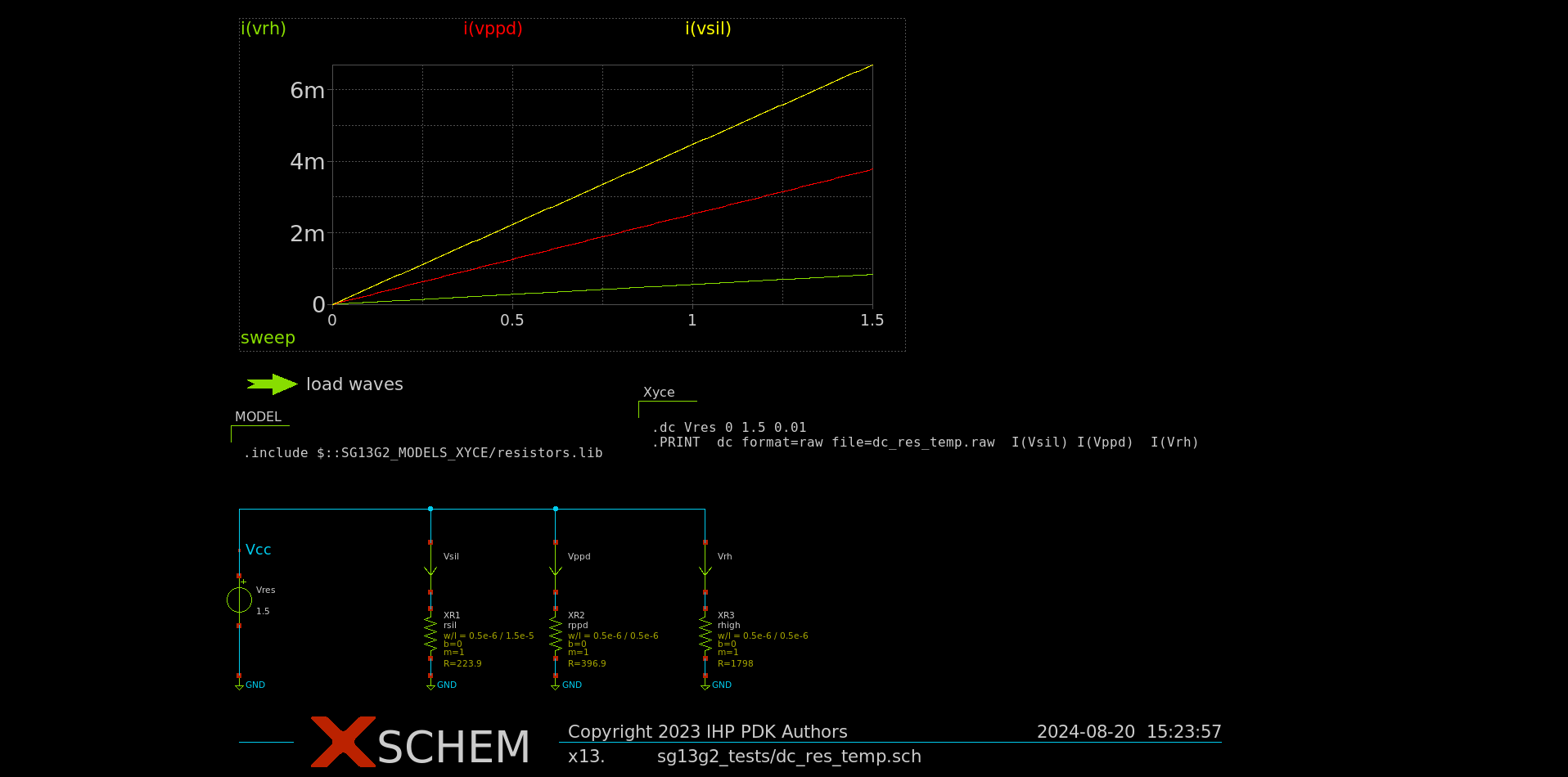
**.subckt dc_res_temp
Vres Vcc GND 1.5
Vsil Vcc net1 0
Vppd Vcc net2 0
Vrh Vcc net3 0
XR1 GND net1 rsil w=0.5e-6 l=1.5e-6 m=1 b=0
XR2 GND net2 rppd w=0.5e-6 l=0.5e-6 m=1 b=0
XR3 GND net3 rhigh w=0.5e-6 l=0.5e-6 m=1 b=0
**** begin user architecture code

.include /home/your_user/your_path_to_pdk/IHP-Open-PDK/ihp-sg13g2/libs.tech/xyce/models/resistors.lib

.dc Vres 0 1.5 0.01
.PRINT  dc format=raw file=dc_res_temp.raw  I(Vsil) I(Vppd)  I(Vrh)

**** end user architecture code
**.ends
.GLOBAL GND
.end
The netlist can be saved as dc_res_temp.spice and simulated calling the following command:
Xyce dc_res_temp.spice
The user should get the following output:
***** Solution Summary *****
        Number Successful Steps Taken:          151
        Number Failed Steps Attempted:          0
        Number Jacobians Evaluated:             57543
        Number Linear Solves:                   57543
        Number Failed Linear Solves:            0
        Number Residual Evaluations:            58868
        Number Nonlinear Convergence Failures:  0
        Total Residual Load Time:               0.0881166 seconds
        Total Jacobian Load Time:               0.04089 seconds
        Total Linear Solution Time:             0.196041 seconds


***** Total Simulation Solvers Run Time: 1.46115 seconds
***** Total Elapsed Run Time:            1.46848 seconds
*****
***** End of Xyce(TM) Simulation
*****

Timing summary of 1 processor
                 Stats                   Count       CPU Time              Wall Time
---------------------------------------- ----- --------------------- ---------------------
Xyce                                         1        1.612 (100.0%)        1.471 (100.0%)
  Analysis                                   1        1.548 (96.08%)        1.461 (99.33%)
    DC Sweep                                 1        1.548 (96.08%)        1.461 (99.33%)
      Solve                                151        1.546 (95.91%)        1.460 (99.24%)
        Residual                         58868        0.167 (10.39%)        0.152 (10.33%)
        Jacobian                         57543        0.114 ( 7.08%)        0.099 ( 6.75%)
        Linear Solve                     57543        0.283 (17.57%)        0.258 (17.55%)
      Successful Step                      151        0.001 ( 0.05%)        0.001 ( 0.04%)
  Netlist Import                             1        0.017 ( 1.07%)        0.003 ( 0.21%)
    Parse Context                            1        0.009 ( 0.58%)        0.001 ( 0.06%)
    Distribute Devices                       1        0.000 ( 0.00%)        0.001 ( 0.07%)
    Verify Devices                           1        0.000 ( 0.00%)        0.000 (<0.01%)
    Instantiate                              1        0.000 ( 0.00%)        0.000 (<0.01%)
  Late Initialization                        1        0.012 ( 0.73%)        0.003 ( 0.20%)
    Global Indices                           1        0.000 ( 0.00%)        0.001 ( 0.08%)
  Setup Matrix Structure                     1        0.002 ( 0.13%)        0.000 ( 0.02%)
The netlist was generated using xschem configured to use Xyce as a simulator