
4.4. Usage
Note
You have the option to execute the SG13G2-DRC through either a Python script via the command-line interface (CLI) or by the Klayout graphical user interface (GUI), as detailed in the subsequent usage sections.
4.4.1. CLI
The run_drc.py script takes your gds to run DRC rule decks with switches to select subsets of all checks.
run_drc.py (--help | -h)
run_drc.py --path=<file_path>
        [--table=<table_name>]... [--mp=<num_cores>] [--run_dir=<run_dir_path>]
        [--topcell=<topcell_name>] [--run_mode=<mode>] [--drc_json=<json_path>]
        [--disable_extra_rules] [--no_feol] [--no_beol] [--no_density]
        [--density_thr=<density_threads>] [--density_only] [--antenna]
        [--antenna_only] [--no_offgrid] [--macro_gen]
Options:
`-h, --help`            show this help message and exit
`--path PATH`           Path to the input GDS file to be processed.
`--table TABLE`         DRC table name(s) to execute (e.g., activ, metal1). This option can be used multiple times.
`--mp MP`               Number of parts to split the rule deck for parallel execution. [default: 1]
`--run_dir RUN_DIR`     Dir to store all run results. If not specified, a timestamped dir under the current path will be used.
`--topcell TOPCELL`     Top-level cell name to use from the input GDS.
`--density_thr DENSITY_THR`
                        Number of threads to use during the density run (default: number of CPU cores).
`--run_mode {deep,flat}`
                        KLayout execution mode: deep, or flat. [default: deep]
`--drc_json DRC_JSON`   Path to a JSON file that defines rule values to use.
`--no_feol`             Disable all FEOL-related DRC checks.
`--no_beol`             Disable all BEOL-related DRC checks.
`--disable_extra_rules` Distable the remaining DRC rules from the full rule set (may be slower).
`--no_density`          Disable density rule checks.
`--density_only`        Run only density rules.
`--antenna`             Enable antenna rule checks.
`--antenna_only`        Run only antenna rules.
`--no_offgrid`          Disable offgrid rule checks.
`--macro_gen`           Only generate the DRC rule deck without running.
Note
By default, the main DRC rule set will be executed, which includes density rules.
To disable density checks, use the --no_density switch.
Tip
If the --drc_json=<json_path> option is not provided, the script will get rule values as following:
1. Attempt to load the SG13G2 technology JSON file: SG13G2 tech JSON file.
2. Fall back to default DRC values: default tech DRC values file.
Example:
python3 run_drc.py --path=testing/testcases/unit/activ.gds --run_mode=deep --run_dir=test_activ --no_density
DRC Outputs
You could find the run results at your run directory if you previously specified it through –run_dir=<run_dir_path>. Default path of run directory is drc_run_<date>_<time> in current directory.
Folder Structure of run results
📁 drc_run_<date>_<time>
┣ 📜 drc_run_<date>_<time>.log
┗ 📜 main.drc
┗ 📜 <your_design_name>.lyrdb
The outcome includes a database (<your_design_name>.lyrdb) containing DRC results. You can view it by opening your gds file with: klayout <device_name>.gds -m <your_design_name>.lyrdb. Alternatively, you can visualize it on your GDS file using the netlist browser option in the tools menu of the KLayout GUI as illustrated in the following figures.
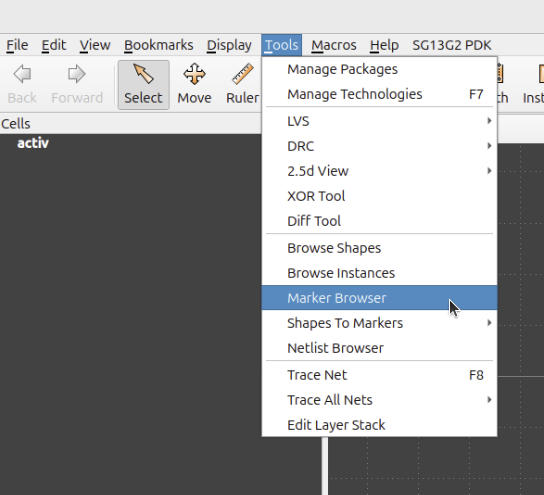
Figure 4.4.1 Marker Browser for Klayout-DRC -1
After selecting Marker Browser option, you could load the database file and visualize the DRC results.
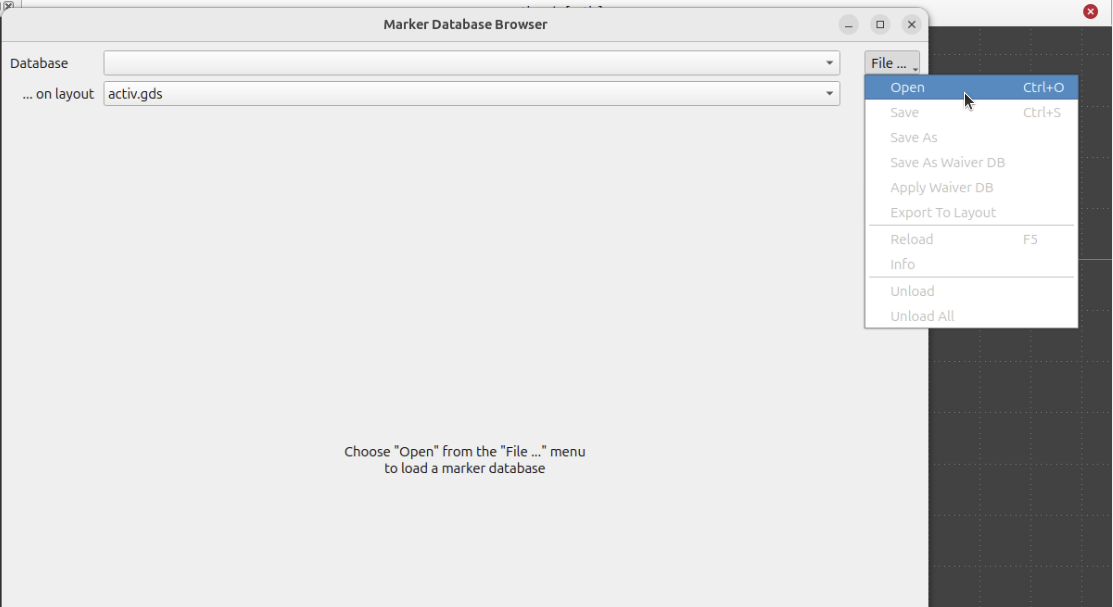
Figure 4.4.2 Loading DRC database file - 1
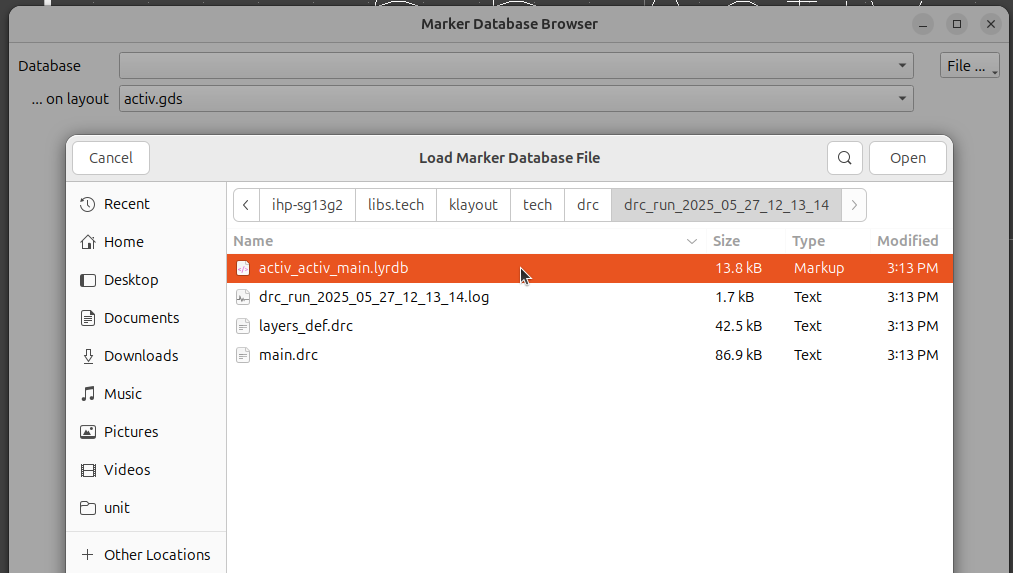
Figure 4.4.3 Loading DRC database file - 2
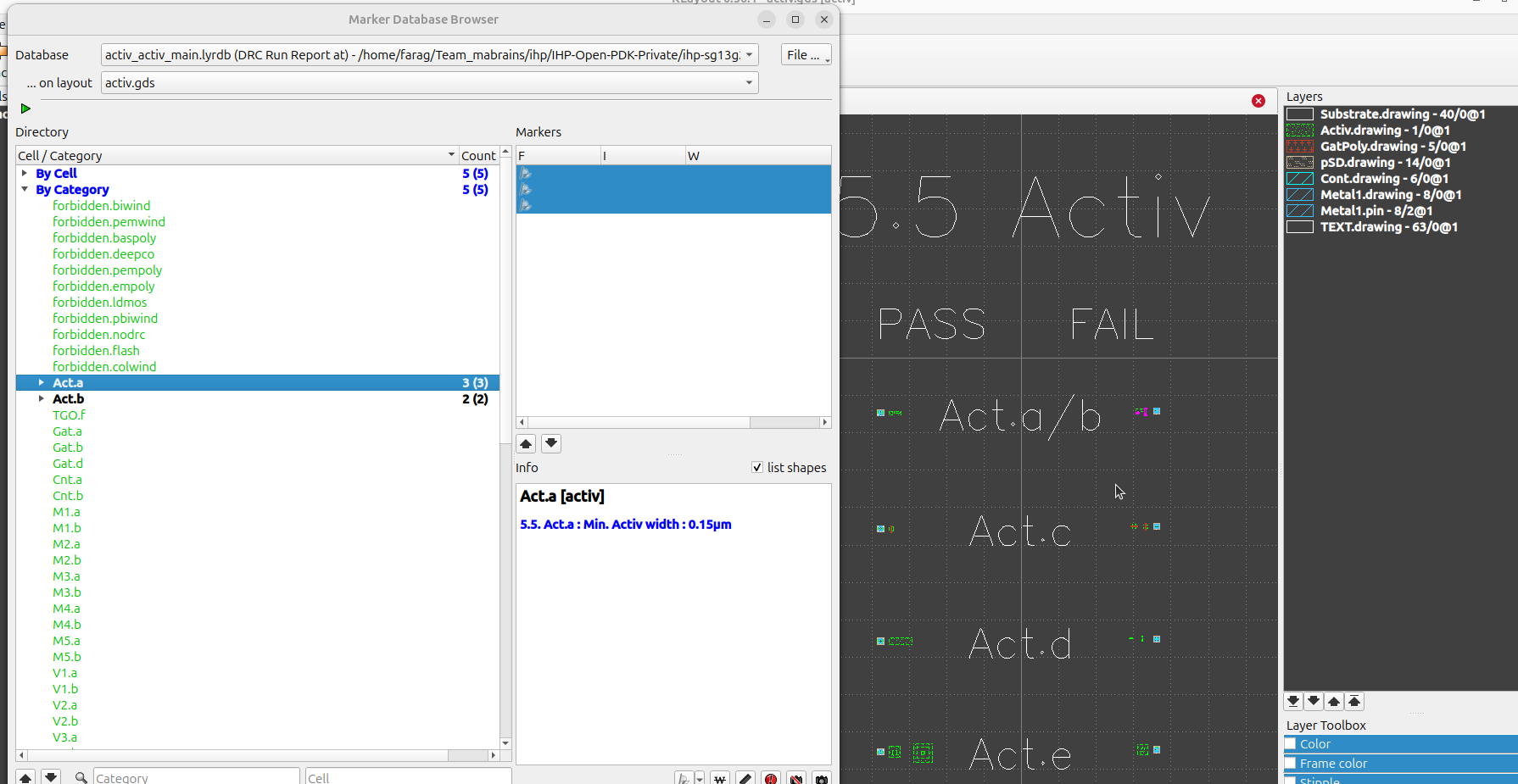
Figure 4.4.4 Visualize DRC results
4.4.2. GUI
The SG13G2 also facilitates DRC execution via Klayout menus as depicted below:
First, you need to add the DRC menus to your KLAYOUT_PATH, you could do that by executing the following command:
KLAYOUT_PATH=$PDKPATH/libs.tech/klayout:$PDKPATH/libs.tech/klayout/tech/ klayout -e
Tip
In this context, PDKPATH refers to the path leading to the IHP-Open-PDK/ihp-sg13g2 directory within the current repository.
Then, you will get the DRC menus for SG13G2, you could set your desired options as shown below:
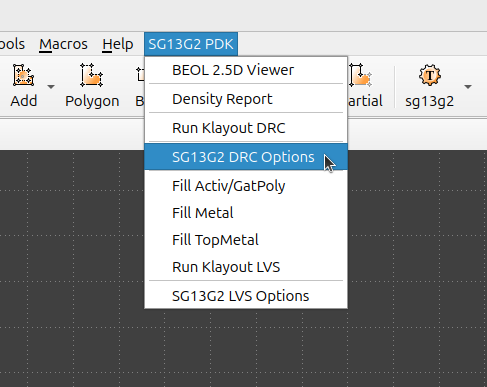
Figure 4.4.5 Setting up DRC Options-GUI - 1
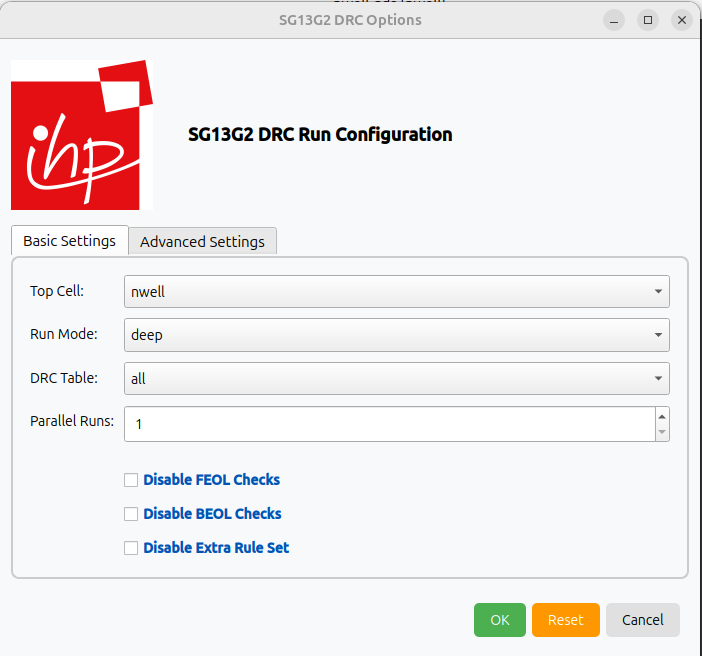
Figure 4.4.6 Setting up DRC Options-GUI - 2
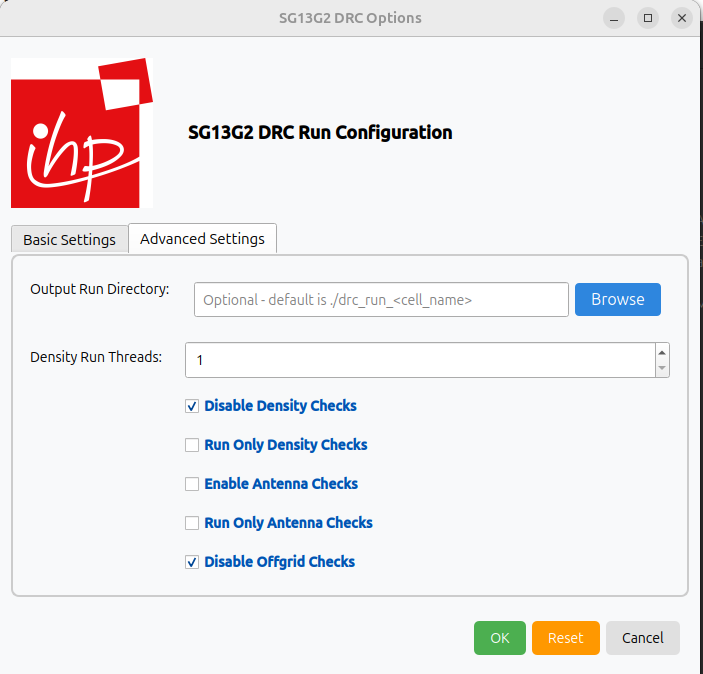
Figure 4.4.7 Setting up DRC Options-GUI - 3
For additional details on GUI options, please refer to the CLI.
Finally, after setting your option, you could execute the DRC using Run Klayout DRC from the dropdown menu.
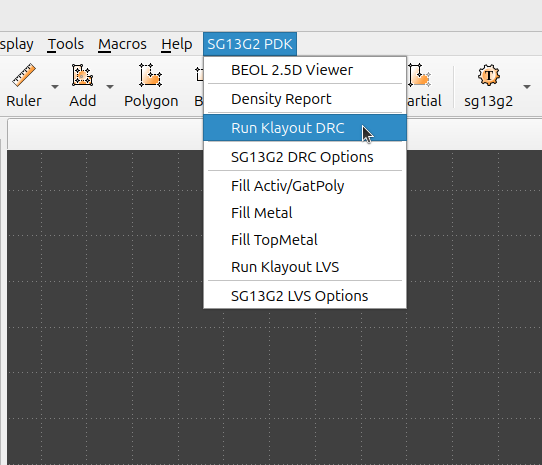
Figure 4.4.8 Running DRC using Klayout menus
Upon executing the DRC, the result database will appear on your layout interface, allowing you to verify the outcome of the run.
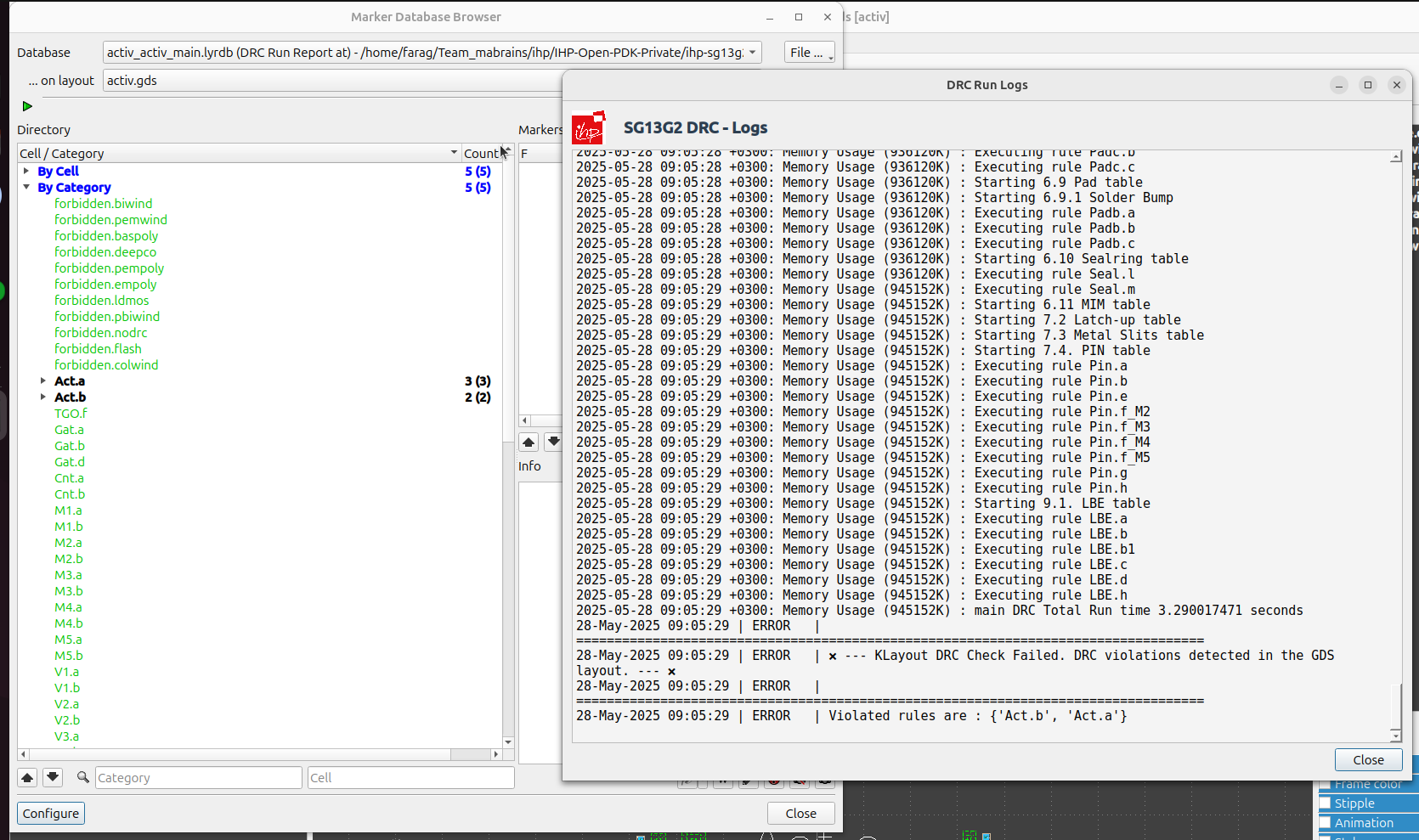
Figure 4.4.9 Running DRC using Klayout menus